QuickBooks knows what you own. Not what's already promised.
"My stock number says five, but two of those are already sold and still sitting here."
"Sales promises a delivery date and the warehouse finds out when the customer calls."
"Somebody loaded the wrong colour again."
"Goods went out and the customer still owes us money."
"A container turned up and nobody in the warehouse knew it was coming."
"A customer asks if their order is ready and we have to walk to the back of the building to find out."
"Two people sold the same sofa."
"We're spending the day on phone calls between the desk and the warehouse."
None of this is a QuickBooks problem. QuickBooks is an accounting system: it records what you own and what you've billed. It has no idea what's promised, picked, staged or on a truck. That gap is where the day goes.
So we build a web application that sits beside QuickBooks Online, not on top of it. It takes the invoices, items, customers and purchases already in your QuickBooks company and turns them into a working warehouse system — reserved stock, orders that reach the crew by themselves, barcode picking on a phone, ready at dock → out for delivery → delivered, with every step written back into the QuickBooks invoice. It is already running in production for a furniture business on QuickBooks Online.
What it does
What it does
Every screen below shows invented demo data for a fictional furniture company — never a real customer's information.
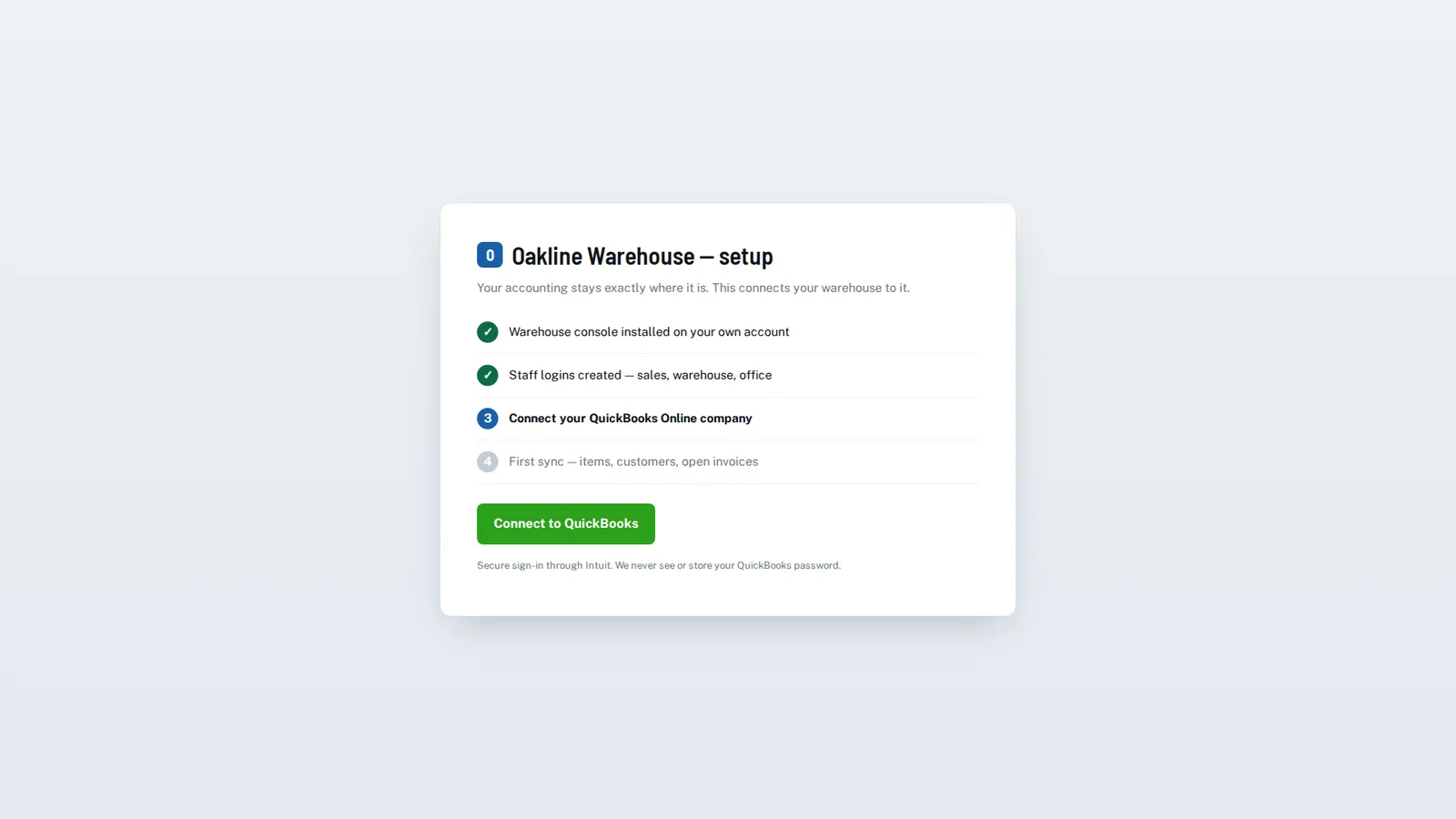
Connected to your QuickBooks Online company
Secure connection through Intuit’s own sign-in (OAuth). We never see or store your QuickBooks password.
Items, customers, invoices, bills and purchases sync automatically, every few minutes. Nothing is typed twice.
Existing data appears immediately. Day one starts with your real item list and real open orders, not an empty system.
Your own Intuit app credentials. The connection belongs to you, not to a shared vendor account.
Reserved stock
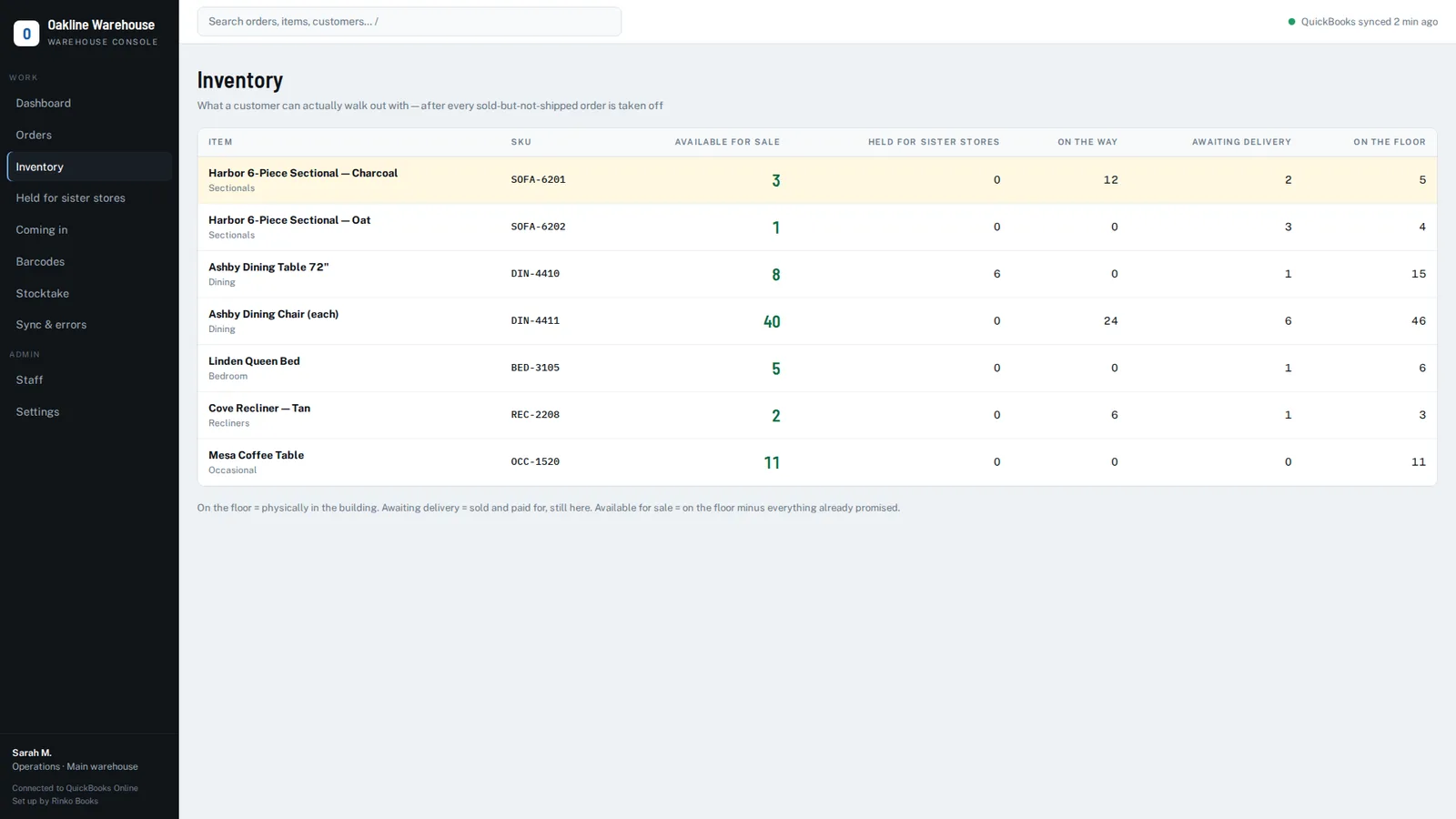
Reserved the moment an invoice is raised. That stock comes off "available for sale", so the same item cannot be sold twice.
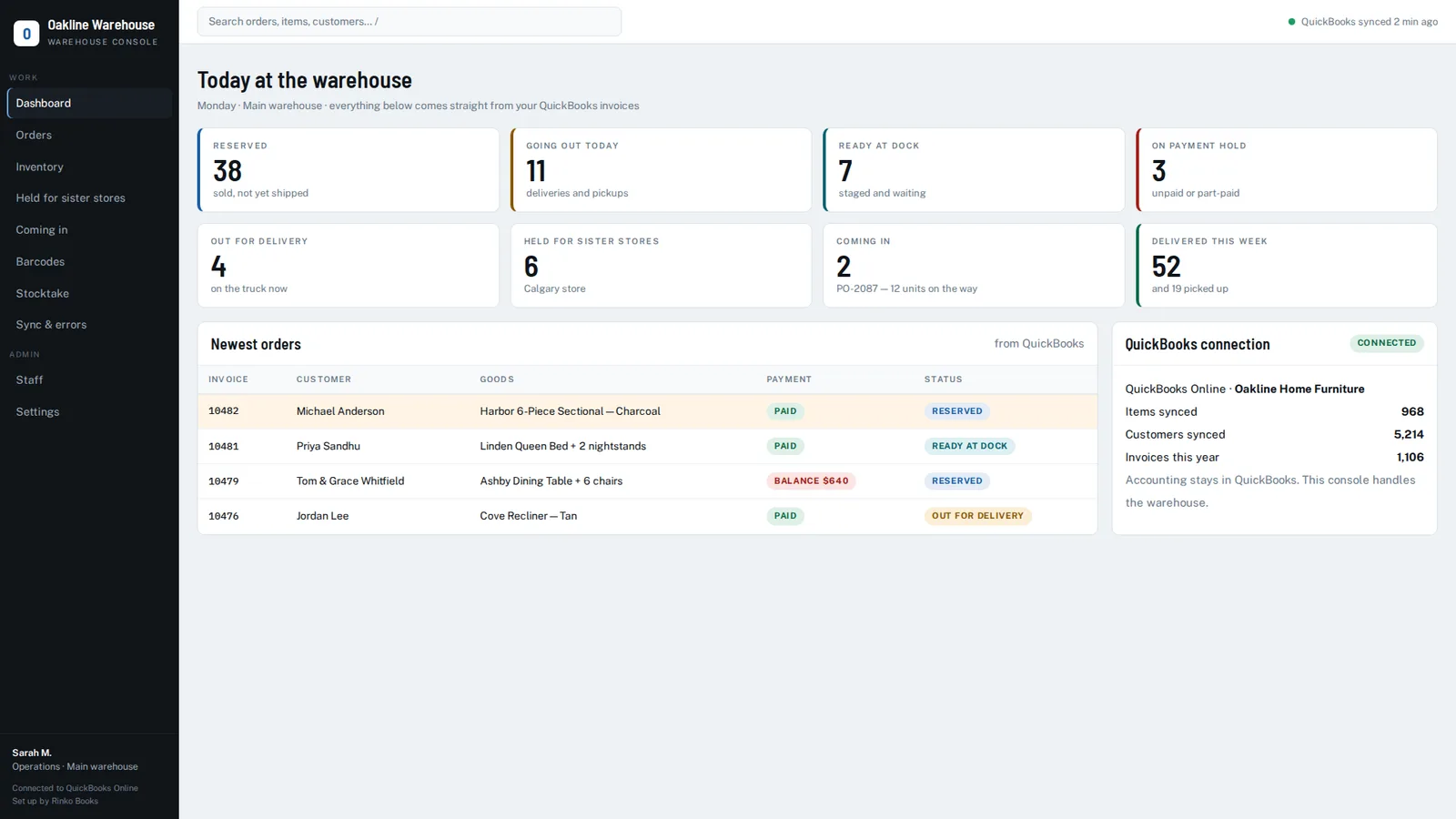
"Available for sale" is the headline number — on the floor, minus sold and waiting, minus what another branch is holding. The honest number a salesperson can promise from.
A column for every state: on the floor, awaiting delivery, on the way in, held for a sister branch, available for sale.
Negative and oversold stock is flagged, so quantities that are already wrong in QuickBooks surface instead of hiding.
Orders that reach the warehouse by themselves
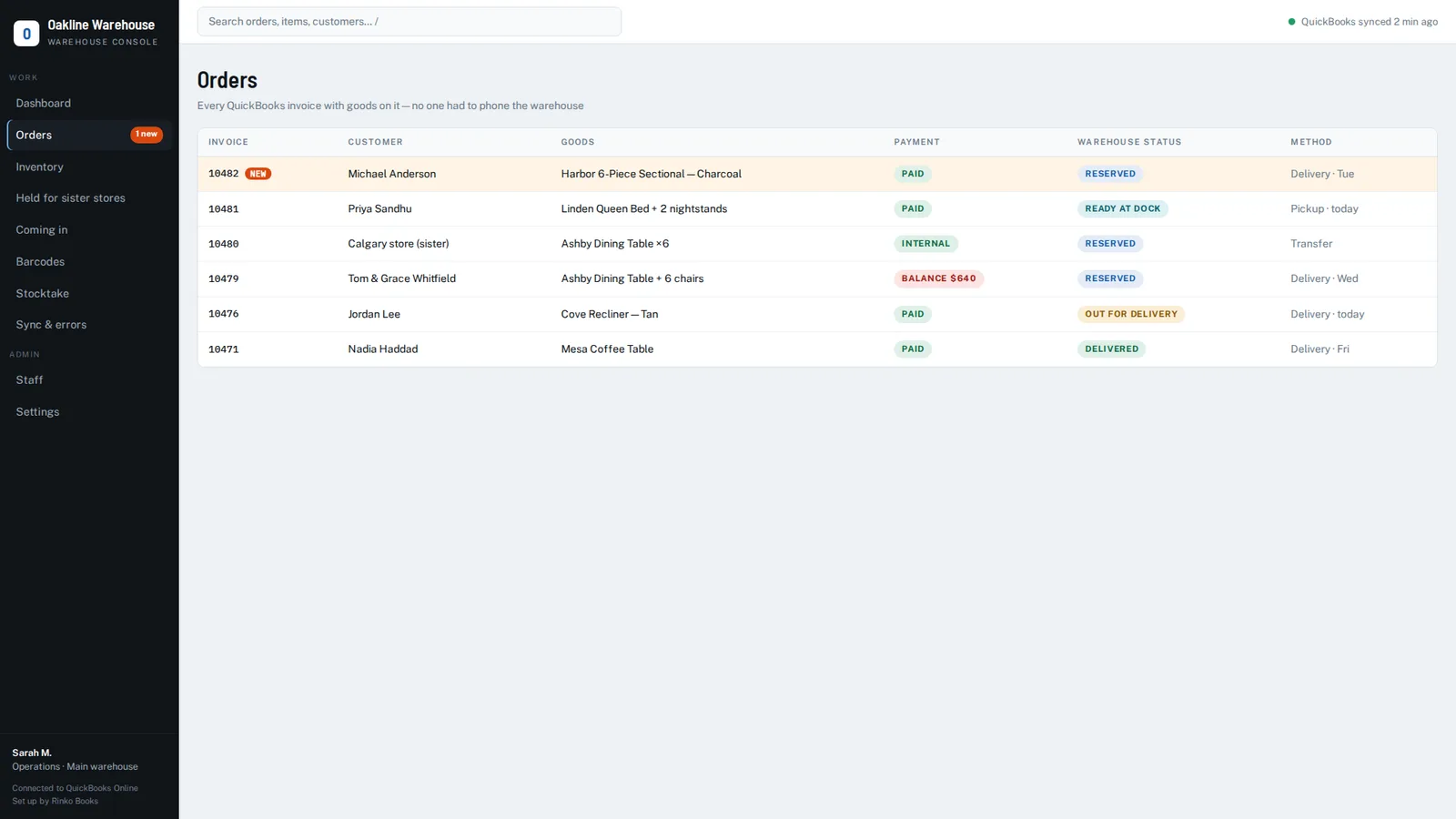
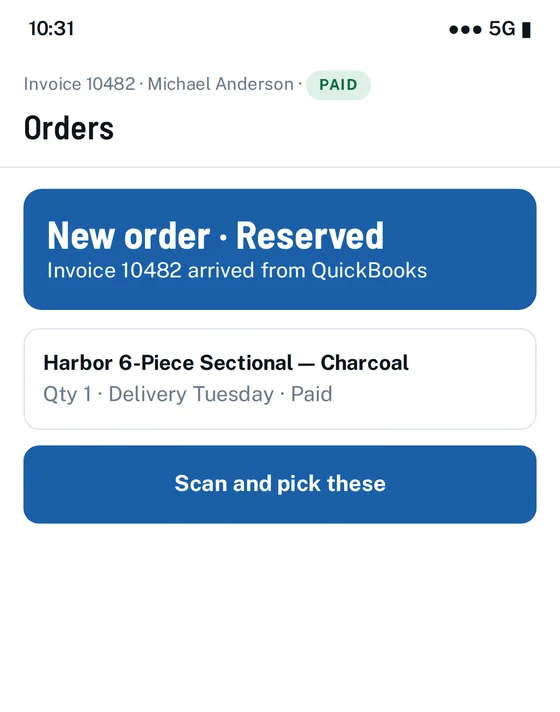
New orders appear automatically, already reserved, with the customer, the goods, delivery or pickup, and payment status.
A badge and notification for the crew, so staging starts without anyone walking over to tell them.
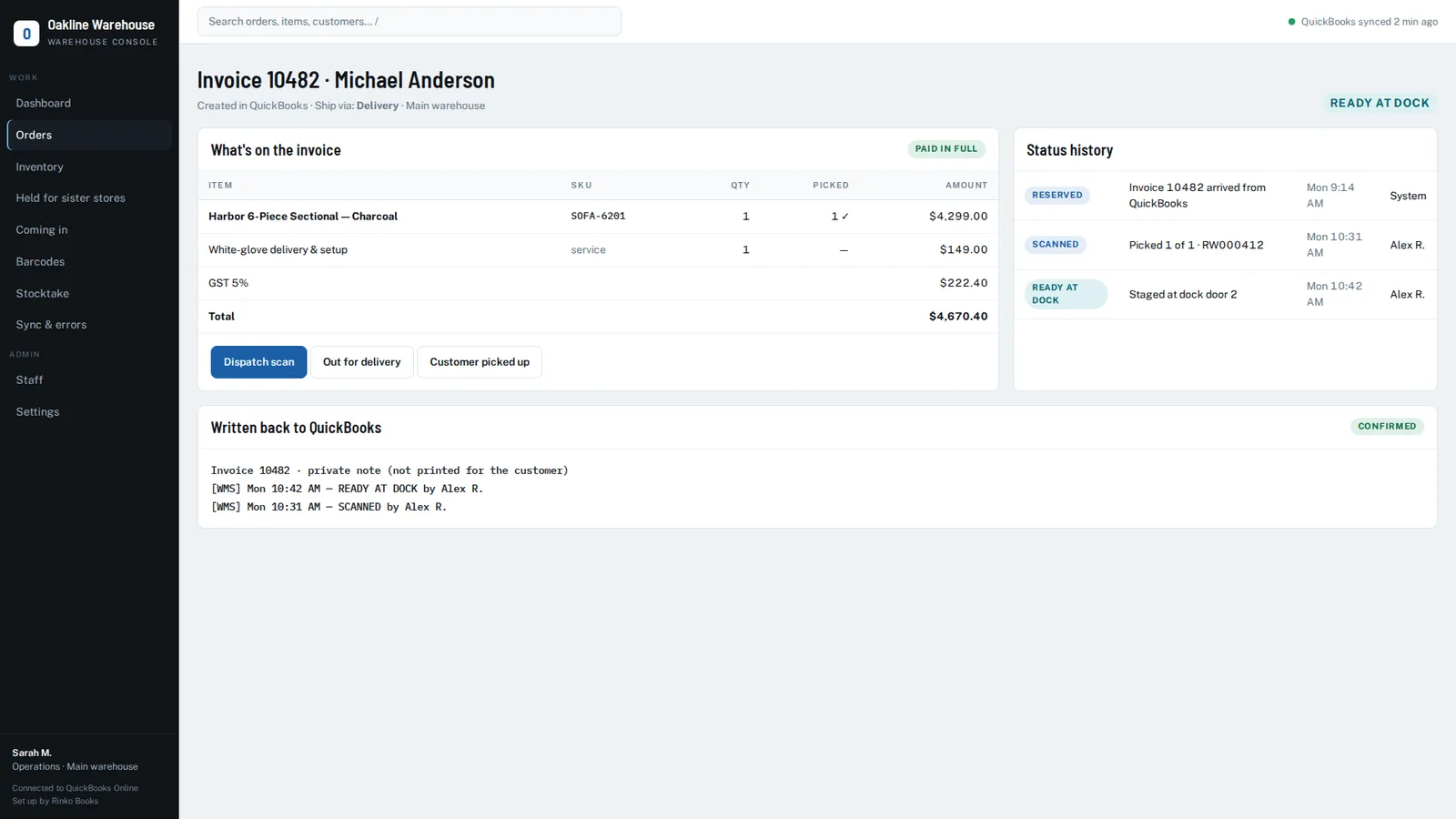
Full invoice detail, read-only — every line, including services and non-stock lines, so the total matches QuickBooks to the cent.
Barcode picking
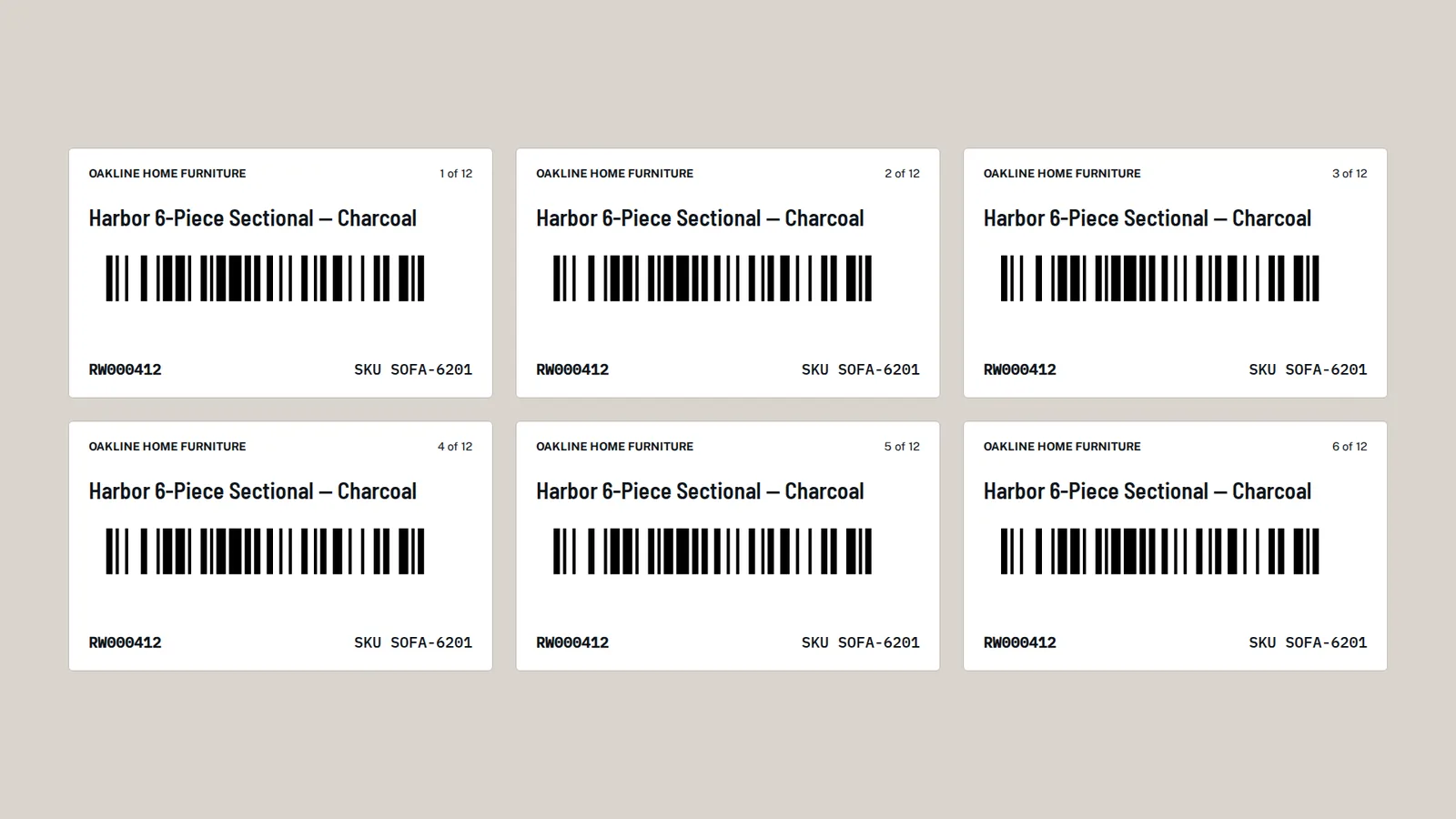
A barcode label per piece, printed from the system. Stable, unique, reprintable.
Scan with a phone camera or a handheld laser scanner. No app store download — it runs in the browser.
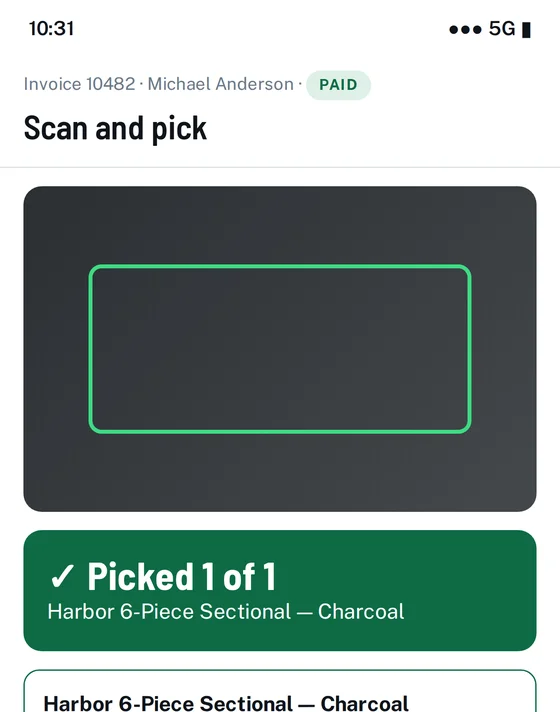
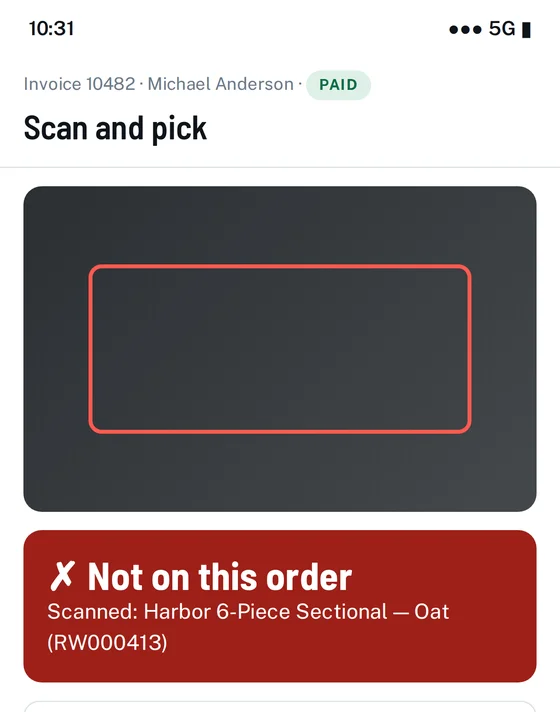
Instant feedback: a green band and a rising beep for the right item; a red band and a buzz for the wrong one, with the reason — not on this order, all already picked, unknown code.
Wrong items are refused before they reach the truck.
Undo the last scan without calling a manager.
Every scan recorded, including refusals — who scanned, what, and when. Double-scan protection means a repeated tap can never deduct stock twice.
Ready at dock
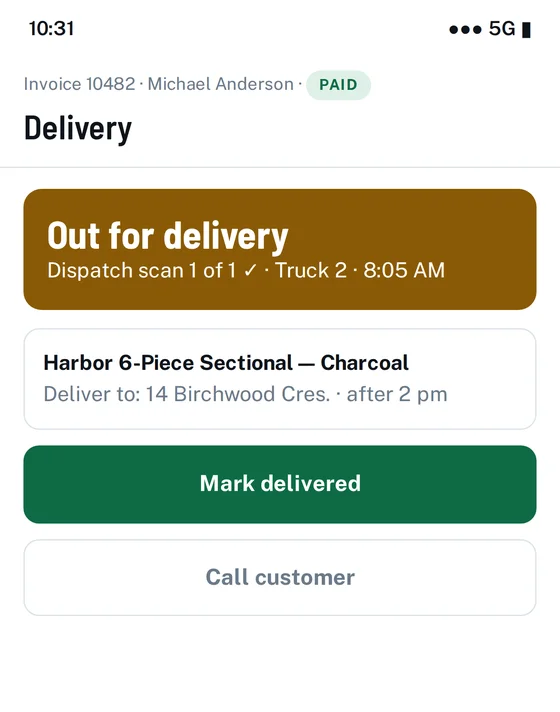
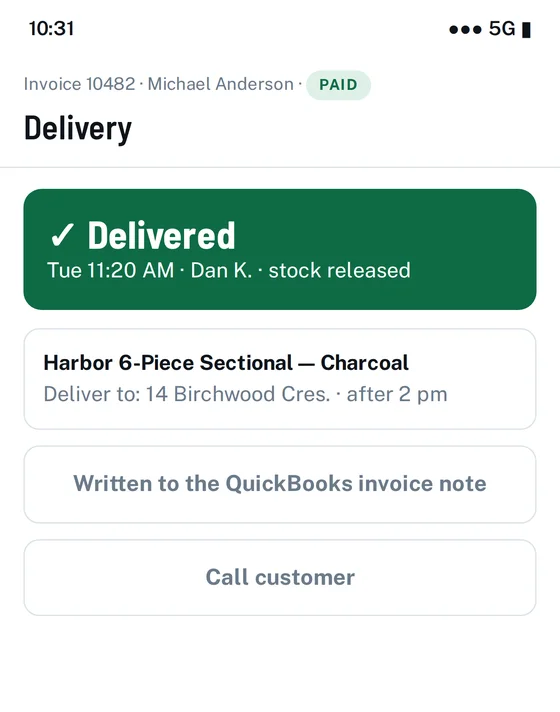
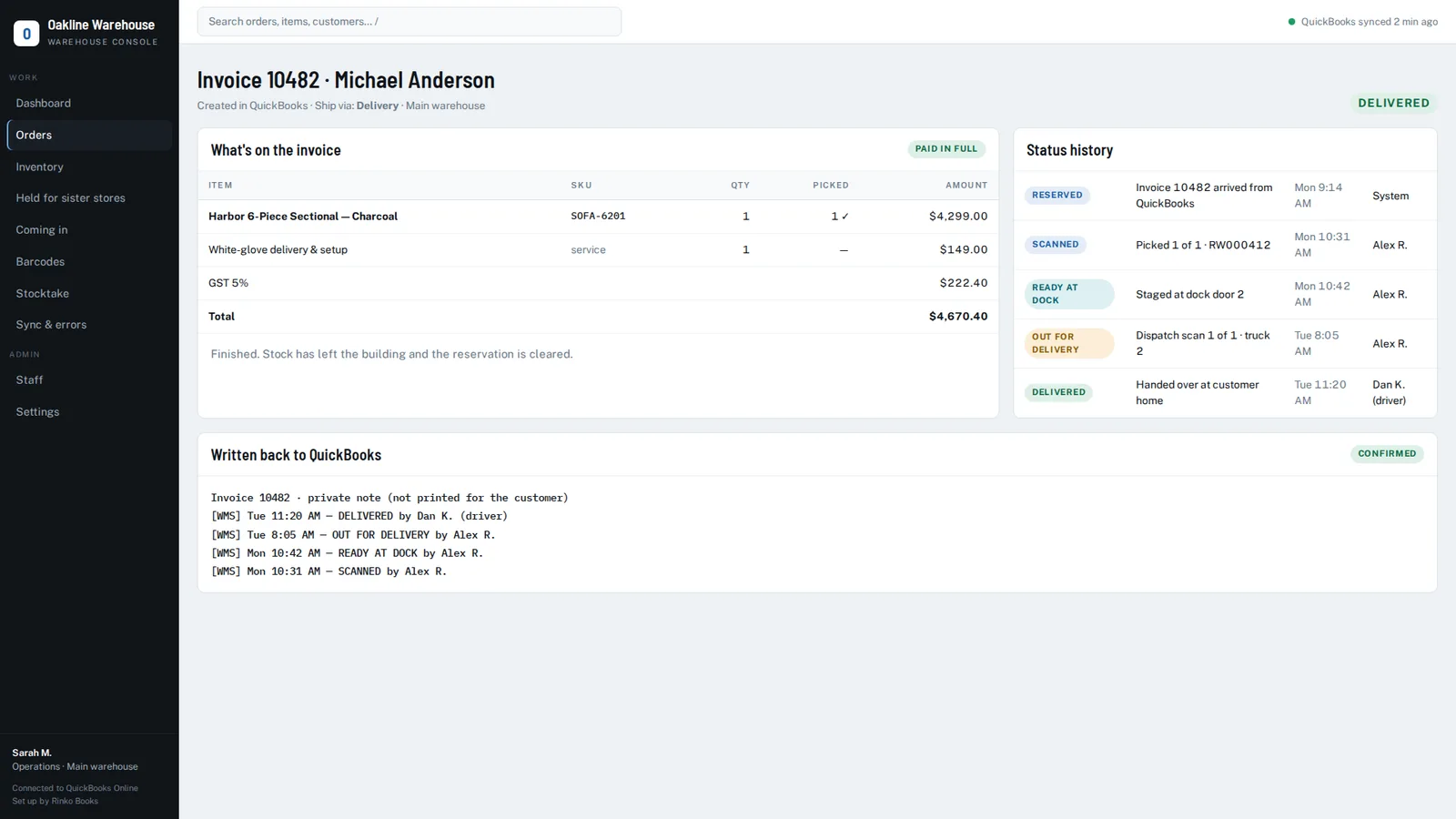
Reserved → picking → ready at dock → out for delivery → delivered / picked up.
"Ready at dock" earns its keep: anyone at a desk can answer "is my order ready?" in two seconds without walking to the warehouse.
A second scan at dispatch. What was staged on Monday is verified again as it actually leaves on Wednesday.
Stock only leaves the books when goods leave the building — on delivery or customer pickup, never before.
The payment gate
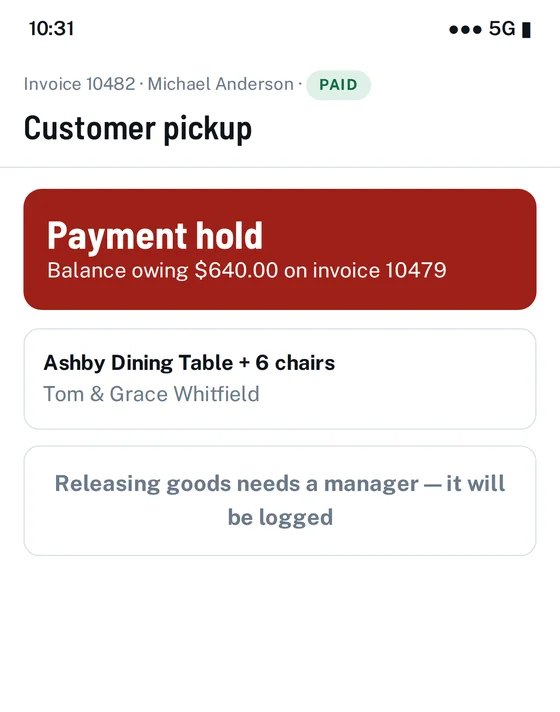
Payment status from QuickBooks on every screen, including the phone in the warehouse.
Unpaid or part-paid orders are flagged at the dock. Releasing them anyway requires a manager, and that decision is logged with a name and a time.
Configurable: warn, or block outright, depending on how you want to run.
Written back into QuickBooks
Each status change is appended to the invoice’s private note in QuickBooks — an internal memo, never printed on the customer’s invoice.
Accounting figures are never touched. No amounts, no accounts, no tax, nothing your bookkeeper relies on.
Append-only. Anything a person typed in that note is preserved.
Queued and retried, so the warehouse never waits on an API, and nothing is reported as synced until QuickBooks confirms it.
Goods coming in
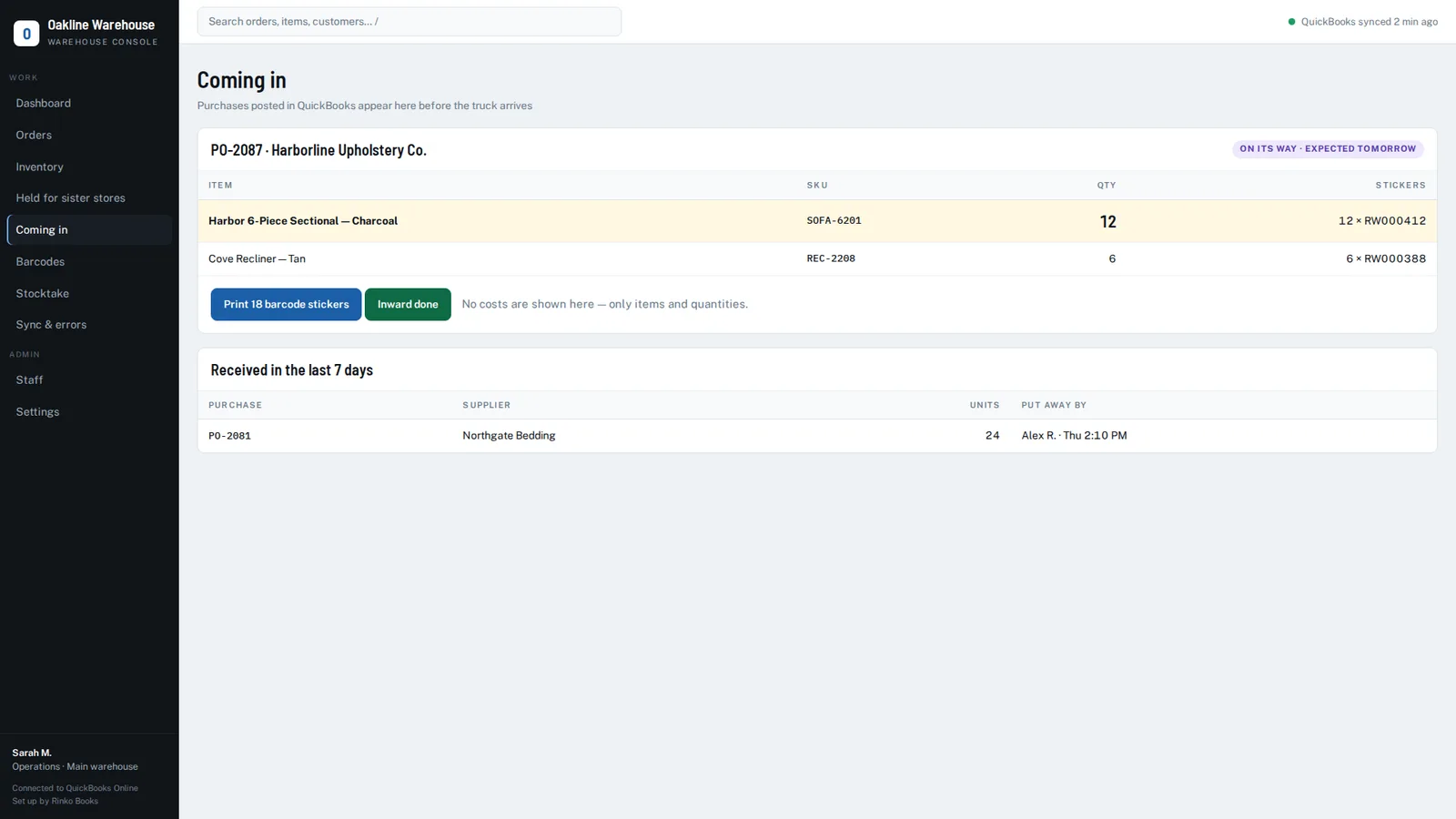
Purchases posted in QuickBooks appear as "Coming in" before the truck arrives, so sales can promise against stock that is on its way.
Barcode labels printed for the whole delivery, ready to apply as the container is unloaded.
"Inward done" records that the goods are physically in the building and who put them away.
No costs shown on this screen — warehouse staff never see what stock cost.
Sister branches
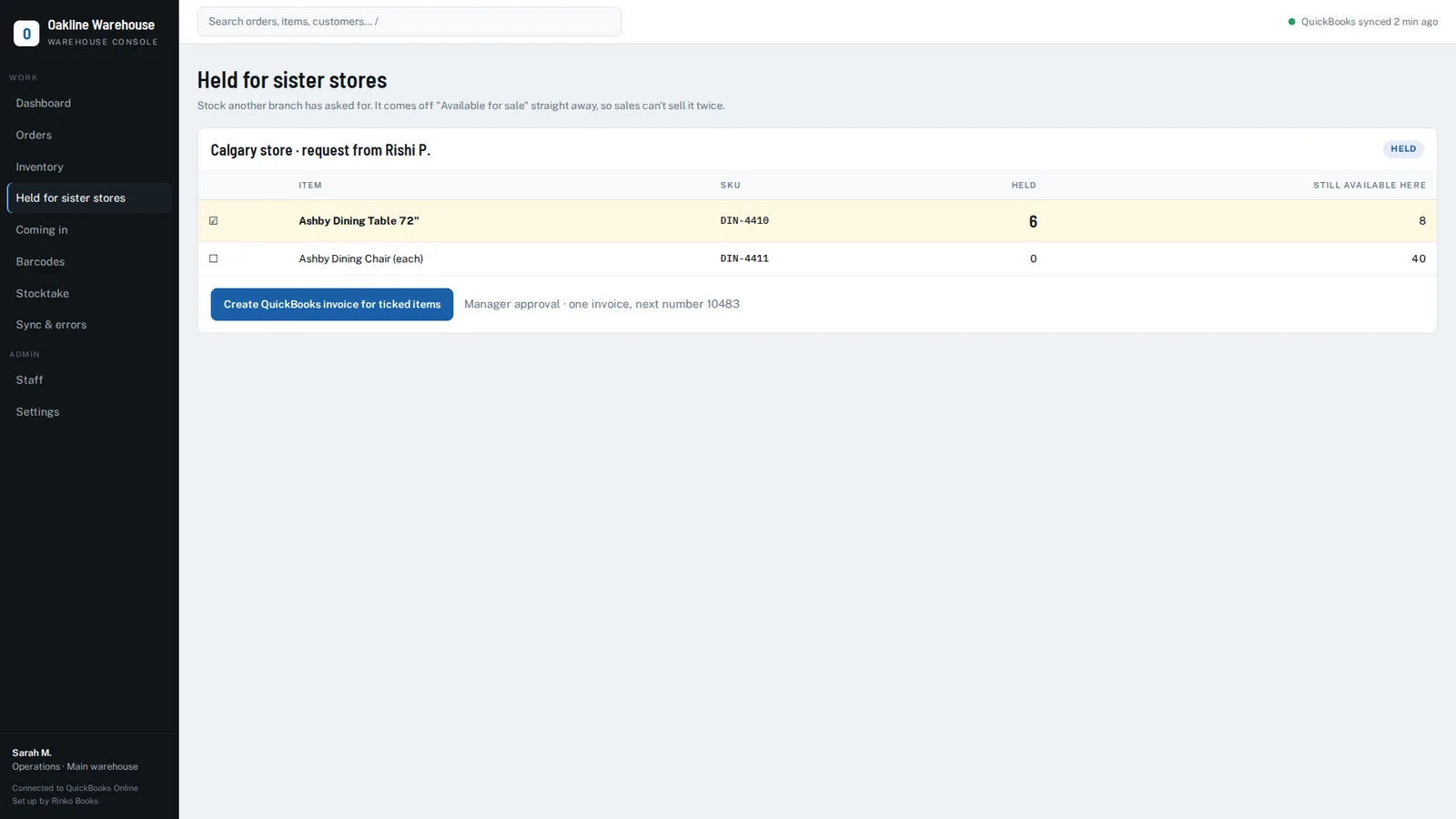
Stock held for another branch comes off "available for sale" immediately, so the main store can’t sell what’s already promised.
A manager raises the internal invoice for the held items in one action.
Warehouse assignment comes from QuickBooks’ own location tracking, and can be overridden by an authorised user — an override a sync will never quietly undo.
Stocktake — and the everyday things
The whole stock list is the count sheet. Filter by category, status or search.
Blank means not counted, zero means none — a distinction most systems get wrong. Posted line by line, with who entered each figure.
Built for a phone held in one gloved hand: bottom navigation, big targets, full-width status buttons.
One search box across orders, items, customers and locations. Dashboard counts are clickable — "38 reserved" opens those 38 orders.
Roles and permissions for sales, warehouse, office, manager and admin, with every action attributable and a full status history per order.
The alternative
Why not just switch to an inventory system?
Every inventory system on the market has the same answer: move to ours. Six months of implementation, a bill to match, and a bookkeeper learning a new chart of accounts. For most businesses that's a cure worse than the illness. So we do the opposite — keep QuickBooks, add only the missing layer, and shape it around how you already work.
Tools such as Fishbowl, inFlow, Katana, SOS Inventory and Cin7 are capable products, and for some businesses they're the right call. They ask you to adopt a new system and reshape your process around it. This is a custom deployment for your own item list, locations and workflow — with QuickBooks Online still at the centre. Not an ERP migration: no data move, no chart-of-accounts rework, no retraining the bookkeeper.
How we set it up
How we set it up
Discovery call. We look at how orders move through your business today.
Deployment. The app is installed on its own hosting with its own database, for you alone.
Connection. You connect your QuickBooks Online company through Intuit's secure sign-in. Items, customers and open invoices sync within minutes.
Configuration. Locations, staff logins, delivery and pickup terms, and the payment policy are set to match how you actually run.
Barcodes. Labels are printed and applied, usually starting with what sells most.
Training. Under an hour for the warehouse crew — the phone screen is deliberately simple — and a short session for the office.
Go live and support. We stay alongside for the first weeks, then continue with support and changes as your business changes.
Typical time from start to live: 2 to 4 weeks, depending on how ready your item list and barcodes are.
How it's built
Hosted on modern cloud infrastructure — one deployment and one database per client. No shared tenancy.
Connects to QuickBooks Online through Intuit's official API, using your own app credentials.
No accounting data is ever written except an internal note on the invoice.
Cost data is never shown to warehouse users.
Pricing
Pricing
Setup & Configuration
From $1,299 one-time
Discovery, deployment, QuickBooks connection, configuration, barcode setup and training.
Monthly
From $60 / month
Hosting, support, sync monitoring and small changes.
Custom Work
Quoted separately
New screens, reports or workflow changes specific to your business.
The exact price depends on locations, users, and the level of workflow customization required.
Honest limits
What it doesn't do
QuickBooks Online only. QuickBooks Desktop is not supported.
Stock counts are corrected by a person. QuickBooks' API has no inventory-adjustment document, so a stocktake produces the figures and a human posts the correction. We don't pretend otherwise.
Stock transfers between two warehouses are not built yet — they arrive when a client needs a second warehouse.
It's a custom deployment, not a self-signup product. There's no free-trial link; there's a demo on your own data.
Not a fit for pure e-commerce dropshippers or service businesses with no physical stock.
Who it's for
Built for businesses that sell before they ship
Small and mid-sized businesses on QuickBooks Online that hold physical stock and deliver it — typically 3 to 50 staff, one to three locations, hundreds to a few thousand SKUs, and goods sold days or weeks before they leave:
No. QuickBooks keeps doing all of your accounting and invoicing. This handles the part QuickBooks was never built for: reserved stock, picking, dock status and delivery. Your bookkeeper's work doesn't change.
Can QuickBooks Online reserve stock for an order?
Not on its own. QuickBooks reduces stock when the invoice is created, but it doesn't tell your warehouse which physical item is spoken for. That's what the reservation layer does — sold stock comes off "available for sale" straight away, so nobody sells it twice.
Does QuickBooks Online support barcode scanning?
Not for warehouse picking. We add it: a barcode label on each piece, scanned with a phone camera or a handheld scanner, with an audible confirmation for the right item and a refusal for the wrong one.
Do we have to move our data anywhere?
No. Nothing is migrated. The app reads your existing QuickBooks company and starts working with the items, customers and open invoices already there.
What does it write back into QuickBooks?
Only an internal note on the invoice recording the warehouse status and who changed it. No amounts, no accounts, no tax figures. Nothing that appears on a customer's invoice.
Will our warehouse staff actually use it?
The phone screen shows one job at a time: scan the sticker, watch for the green flash. Training takes under an hour, and nobody needs to sit at a computer.
Can it handle more than one location?
Yes. Stock held for a sister branch comes off available stock immediately, and warehouse assignment follows your QuickBooks location tracking. Transfers between two warehouses are on the roadmap.
Does it work with QuickBooks Desktop?
No, QuickBooks Online only.
How long does setup take?
Usually two to four weeks from the first call to going live, depending on how ready your item list and barcodes are.
How much does it cost?
A one-time setup fee and a monthly fee. The exact figure depends on locations, users and customisation — get in touch and we'll quote on what you actually need.
A 20-minute call. We'll look at how orders move through your business today and show you exactly where the gaps are — whether or not you end up working with us.
QuickBooks and QuickBooks Online are trademarks of Intuit Inc. Rinko Books' warehouse software works with QuickBooks Online; it is an independent product and is not made, endorsed, certified or sponsored by Intuit.