Your QuickBooks says you have five sectionals. Your warehouse has five sectionals. You can actually sell three — and nobody in the building knows which two are already gone.
We made a five-minute film about that gap, built around the workflow of a real furniture business running QuickBooks Online. (The business isn't named, and all the data on screen is invented.) Watch it here, or open it on YouTube for the chapters:
Before: a normal morning
A salesperson closes an order for a charcoal sectional and raises the invoice in QuickBooks. That's where the system's knowledge ends. Then the calls start.
- "Which sectional?" The warehouse manager walks the aisle with a printed sheet, looking at three that look the same.
- The wrong colour goes on the truck. Beige instead of charcoal. Nobody catches it until the customer does.
- Goods leave with money still owing. A dining table goes out on pickup; the balance was never paid, and nobody at the dock could see that.
- A container nobody announced. A purchase was posted in QuickBooks weeks ago. The warehouse finds out when the truck arrives.
- "Is my order ready?" The customer is put on hold while someone walks to the back of the building.
At the weekly meeting the owner says it plainly: we're selling more and finding less. And the obvious fix — replacing QuickBooks with an ERP — is off the table. The bookkeeper, the accountant and years of history all live in QuickBooks.
After: keep QuickBooks, connect the warehouse
Instead of replacing anything, the business connects its existing QuickBooks Online company to a warehouse layer for QuickBooks Online. Its own items, customers and open invoices appear within minutes. Every piece gets a barcode label.
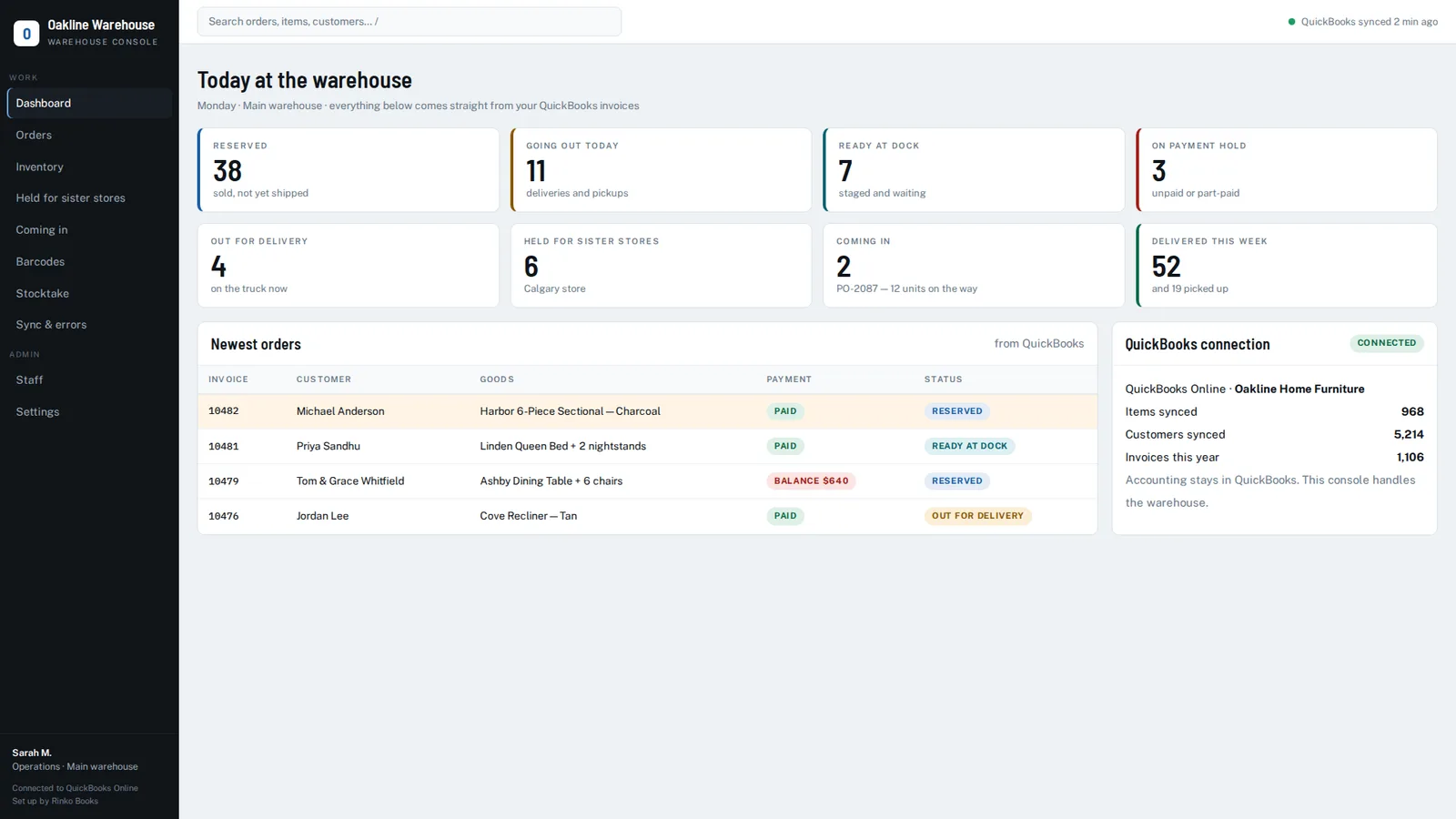
Now the same sale looks different:
- The invoice is raised in QuickBooks. The sectional is reserved immediately and comes off "available for sale" — nobody else can sell it.
- The order appears in the warehouse by itself, with the customer, the goods, delivery or pickup, and payment status. No phone call.
- The crew scans to pick. The beige one gets a red band and a buzz — not on this order. The charcoal one gets green and a beep.
- Ready at dock. When the customer calls, the answer takes two seconds, from any desk.
- An unpaid pickup is stopped at the dock. Releasing it needs a manager, and the decision is logged.
- Out for delivery, then delivered. Stock leaves the books only when the goods leave the building.
- The whole story is on one screen — and written back into the QuickBooks invoice as an internal note, with who did what and when.
Incoming purchases show up as "coming in" before the truck arrives, with labels ready to print. Stock held for the sister store comes off available stock the moment it's held.
What didn't change
The accounting. No data was migrated, no chart of accounts was reworked, and the bookkeeper kept working exactly as before. The warehouse layer writes only an internal note to each invoice — never amounts, accounts or tax.
The business is still busy. The confusion is gone.
See it on your own QuickBooks company
A 20-minute call. We'll look at how orders move through your business today and show you exactly where the gaps are.
Book a 20-minute demo →QuickBooks and QuickBooks Online are trademarks of Intuit Inc. Rinko Books' warehouse software works with QuickBooks Online; it is an independent product and is not made, endorsed, certified or sponsored by Intuit.