It's one of the most frustrating ways to lose money: the customer paid a deposit, the balance was due on collection, and somehow the goods went out the door without it. Now you're chasing a customer who already has what they wanted.
For furniture, appliance and building-supply businesses, where orders are large and often collected or delivered days after the sale, this happens more than owners like to admit.
Why it happens
- The warehouse can't see payment status. It lives in QuickBooks, and the people loading the truck don't log into QuickBooks.
- Payments arrive between sale and pickup. A balance might be paid by e-transfer the night before, or not at all. Paper pick sheets printed on Monday don't know what happened on Tuesday.
- Nobody wants to say no to a customer at the dock. Without a clear rule, the person in front of the customer takes the easy path.
Step 1: Decide your policy
Before any tool, decide what should happen. Common policies:
- Paid in full before release — the strictest, typical for walk-in pickup.
- Paid in full, or approved account customer — trade customers on terms are allowed through.
- Warn but allow — the warehouse is told there's a balance, and the customer pays on the spot.
Write it down. Then decide who can override it — usually a manager — and that every override is recorded.
Step 2: Get payment status to the dock
QuickBooks Online already knows whether an invoice is open, partially paid or paid, as long as payments are recorded promptly (bank feeds and QuickBooks Payments help). The job is getting that status to the people who release goods, at the moment they release them.
Low-tech options: a daily "OK to release" list from the office, or a rule that the warehouse calls the office before any pickup. Both work, both rely on people, and both break on busy days.
Step 3: Make the check unavoidable
The strongest version puts payment status on the warehouse's own screen and builds the check into the release step itself:
- Every order shows paid, part-paid or balance owing, read from QuickBooks.
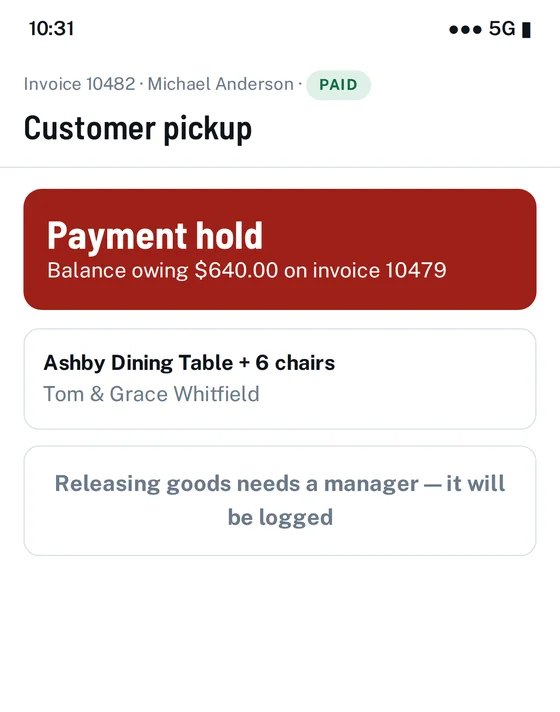
- Unpaid or part-paid orders are flagged at the dock.
- Releasing anyway needs a manager's approval, logged with a name and time.
- The policy is configurable — warn, or block outright.
That's how the payment gate in our warehouse layer for QuickBooks Online works. The warehouse sees the hold on the phone they're already using to scan the order, and the office never has to field a "can this go?" call.
Step 4: Keep the books right
A payment gate only works if QuickBooks is up to date. Record payments the same day, match bank-feed deposits to invoices promptly, and review open invoices with balances due weekly. That's ordinary good bookkeeping — and it's what makes the warehouse check trustworthy.
See it on your own QuickBooks company
A 20-minute call. We'll look at how orders move through your business today and show you exactly where the gaps are.
Book a 20-minute demo →Frequently asked questions
How do I stop goods leaving before payment?
Set a written release policy, make QuickBooks payment status visible to whoever releases goods, require a manager's logged approval to release unpaid orders, and keep payments recorded in QuickBooks the same day.
QuickBooks and QuickBooks Online are trademarks of Intuit Inc. Rinko Books' warehouse software works with QuickBooks Online; it is an independent product and is not made, endorsed, certified or sponsored by Intuit.