It's one of the most common questions in any business that sells before it ships: QuickBooks says we have three. I can see five on the shelf. Which two are already sold?
QuickBooks Online can get you part of the way to an answer. This article shows how, explains why the number on its own isn't enough, and what a business that sells days or weeks ahead of delivery actually needs.
Why QuickBooks and the shelf disagree
On the Plus and Advanced plans, QuickBooks Online reduces an item's quantity on hand when you save an invoice or a sales receipt. That's correct accounting: the sale has happened, so the stock no longer belongs to you in the books.
But physically, nothing has moved. The goods sit in the warehouse until delivery or pickup. So for as long as you have open orders waiting to go out, quantity on hand in QuickBooks will be lower than what's on the floor — by exactly the amount that's sold and waiting.
That gap is normal. The problem is that nobody can see it piece by piece.
Finding sold-but-not-shipped stock with QuickBooks reports
There's no single "sold, not yet shipped" report in QuickBooks Online, but you can build a working list:
- Decide how you mark "delivered". Many businesses use a custom field, a tag, or a word in the invoice memo (for example "DELIVERED 12 Oct"). Without some marker, QuickBooks has no way to separate shipped invoices from waiting ones.
- Run Sales by Product/Service Detail for the period your open orders cover, filtered to the inventory items you care about.
- Filter out invoices already marked as delivered. If you used tags or a custom field, you can filter or group by it; otherwise export to a spreadsheet and filter by the memo.
- Total by item. What's left is your sold-but-not-shipped quantity per item. Add it to QuickBooks' quantity on hand and you should get close to what's physically on the floor.
If your QuickBooks subscription includes sales orders (Intuit has added them on Plus and Advanced in some regions), open sales orders and their committed quantities give the office a similar view earlier in the process. Check whether your region and plan have them.
Where the reports stop
The report tells you how many are sold. It doesn't tell you which ones. In a warehouse full of similar items — three charcoal sectionals, four of the same mattress, two pallets of the same tile — the question on the floor is "which physical piece belongs to which customer?" QuickBooks doesn't track individual pieces, so it can't answer that.
It also goes stale quickly. The list is only as accurate as the last time someone ran it and the last time someone remembered to mark an invoice as delivered. In a busy week, that's often a day behind.
What a working answer looks like
Businesses that have solved this tend to have the same four things in place:
- Reservation happens automatically when the invoice is raised — no one has to remember to update a list.
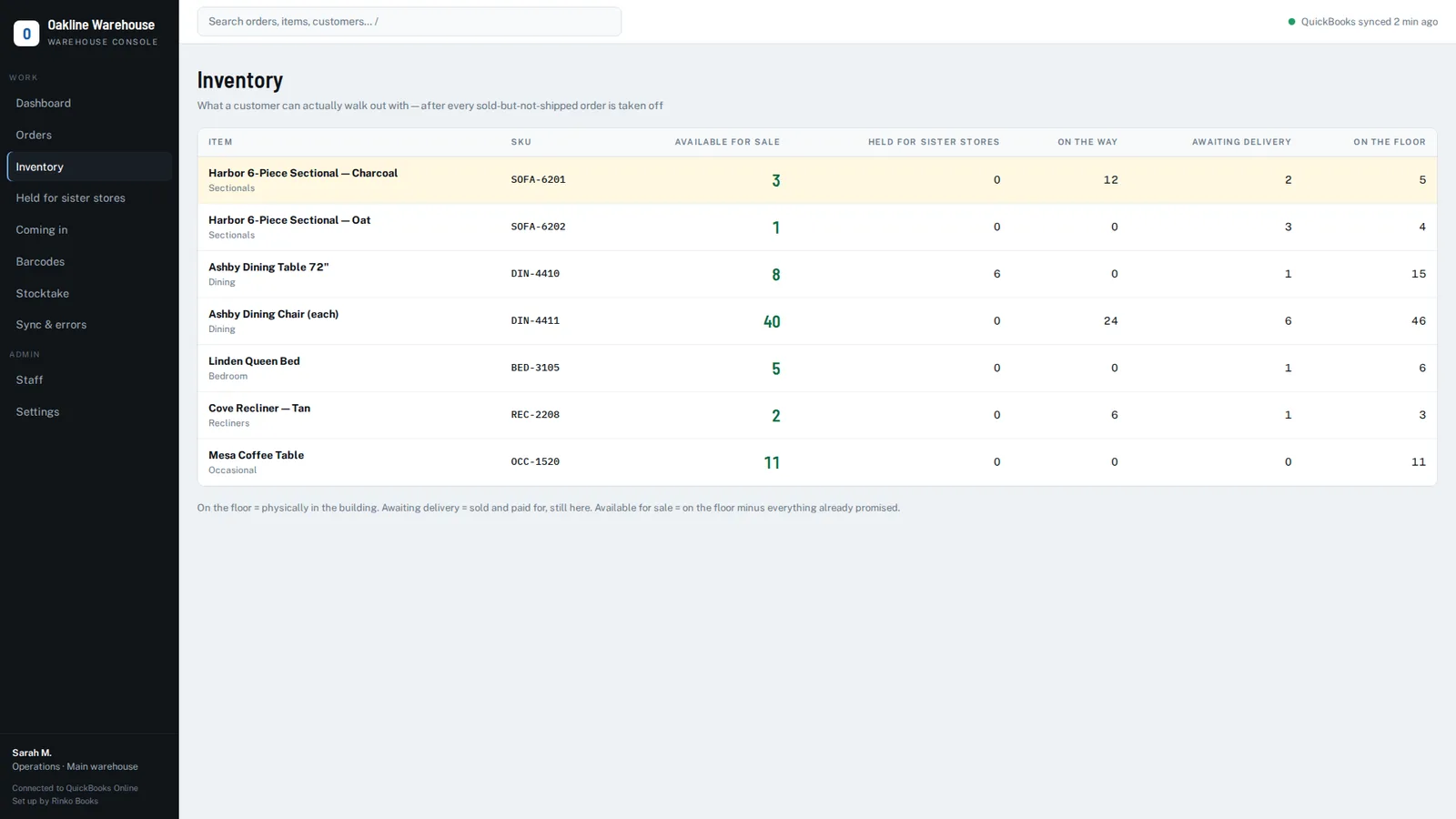
- Separate figures for each state: on the floor, sold and awaiting delivery, held for another branch, coming in, and the one that matters most to sales — available for sale.
- A label on every piece, so the physical item can be tied to an order when it's picked.
- Stock leaves "awaiting delivery" only when it actually leaves the building — recorded at delivery or pickup, not at invoicing.
You can approximate the first two with a disciplined spreadsheet. The last two need something on the warehouse floor.
How we handle it
We build a warehouse layer for QuickBooks Online that reads your invoices and reserves stock the moment an order is raised. The warehouse sees every sold-but-not-shipped order, each piece carries a barcode, and the inventory screen shows on the floor, awaiting delivery, held and available for sale side by side — with nothing changed in your accounting.
See it on your own QuickBooks company
A 20-minute call. We'll look at how orders move through your business today and show you exactly where the gaps are.
Book a 20-minute demo →Frequently asked questions
Why is my QuickBooks quantity on hand lower than what's in the warehouse?
QuickBooks Online reduces quantity on hand when an invoice or sales receipt is saved. If goods haven't been delivered yet, they're still physically in the warehouse, so the shelf shows more than QuickBooks by the amount that's sold and waiting.
Is there a sold-but-not-shipped report in QuickBooks Online?
Not as a single report. You can approximate one by marking delivered invoices (with a tag, custom field or memo) and running Sales by Product/Service Detail for the remaining open orders.
QuickBooks and QuickBooks Online are trademarks of Intuit Inc. Rinko Books' warehouse software works with QuickBooks Online; it is an independent product and is not made, endorsed, certified or sponsored by Intuit.