Short answer: not in the way a warehouse needs. QuickBooks Online reduces your quantity on hand when you create an invoice or sales receipt, so the number goes down. But it doesn't tell the people in your warehouse which physical item is now spoken for, and it doesn't show a separate "sold, not yet shipped" state that a salesperson can promise from. That's the gap that leads to the same sofa being sold twice.
Here's the longer answer: what QuickBooks does, the common workarounds, and what a real reservation looks like.
What happens in QuickBooks Online when you sell stock
On the Plus and Advanced plans, an inventory item has a quantity on hand. When you save an invoice or sales receipt for that item, QuickBooks reduces the quantity and moves the cost from your inventory asset account to cost of goods sold. From an accounting point of view, the sale is done.
But in a business that sells today and delivers next week, the item is still physically in the building. Your QuickBooks number says three; your warehouse can see five. Which two are sold? QuickBooks can't say, because it doesn't track individual pieces or their status on the floor.
What about estimates and sales orders?
Estimates don't affect inventory at all in QuickBooks Online. They're a quote, not a commitment.
Sales orders are a different story depending on where you are. Intuit has added sales orders to QuickBooks Online on the Plus and Advanced plans in some regions, and in those versions saving a sales order updates a committed quantity. If your subscription has them, they're worth using — they give the office a better "available" figure. They still don't give the warehouse a workflow: nothing tells the crew which piece to set aside, nothing moves the order through picking and staging, and nothing stops the wrong piece being loaded. Availability varies by region and plan, so check what your own QuickBooks company offers.
The common workarounds (and where they break)
Tagging the item
A sticky note, a "SOLD" tag, a chalk mark on the box. It works in a small room with one salesperson. It breaks when two people sell from the same stock, when goods are moved, or when a tag falls off.
A spreadsheet of held stock
A shared sheet listing what's sold and waiting. Useful, until it's out of date — which is usually within a day, because updating it is nobody's main job.
Creating the invoice later
Some businesses hold off on invoicing until delivery so QuickBooks still shows the stock as available. That hides the sale from the books, delays revenue recognition decisions, and makes the problem worse: now QuickBooks overstates what you can sell.
Walking to the warehouse
The most common workaround of all. Before promising anything, someone goes and looks. It works, and it quietly eats hours every week.
What a real reservation looks like
A reservation that actually prevents double-selling has four parts:
- It happens automatically the moment the sale is recorded — nobody has to remember to do it.
- It changes the number salespeople use. Instead of "on hand", the headline becomes available for sale: on the floor, minus sold and waiting, minus anything held for another branch.
- It reaches the warehouse. The crew sees the order appear, already reserved, with the goods, the customer, delivery or pickup, and the payment status.
- It's tied to a physical piece at picking. When the crew scans a barcode on the item, the system confirms it's the right one for that order — and refuses the wrong one.
Stock should then leave the books' "awaiting delivery" column only when the goods actually leave the building, on delivery or pickup.
A worked example: five sofas, three available
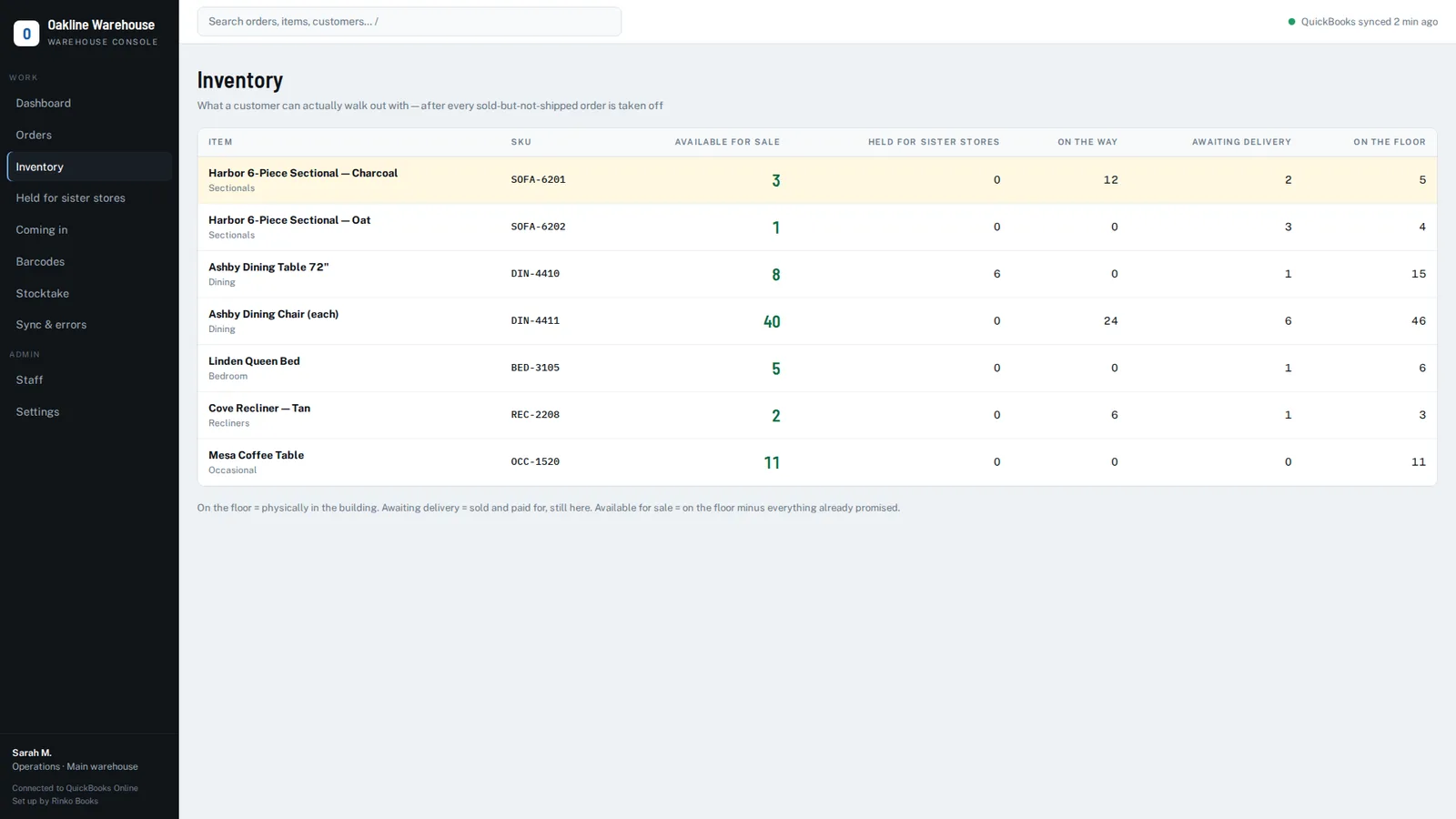
Say you stock a charcoal sectional. Here's how the numbers look on a Tuesday morning:
- On the floor: 5 — what the warehouse can physically count.
- Sold, awaiting delivery: 2 — invoiced last week, delivering Thursday.
- Held for the sister store: 0.
- Coming in: 4 on a purchase order due next week.
QuickBooks shows a quantity on hand of 3, because the two invoices already reduced it. The warehouse sees 5. Neither number, on its own, tells a salesperson what they can promise. The honest figure is available for sale: 3 today, with 4 more expected next week — and the warehouse needs to know which two of the five on the floor belong to Thursday's deliveries.
Now a second salesperson, looking at the showroom floor, sells "one of the five". Without a reservation that reaches the warehouse, there's a real chance Thursday's truck is short, or the wrong piece is loaded. With one, the new sale takes available for sale to 2, the order appears for the crew, and the barcode on each piece decides which sofa goes to whom. This is what's usually called available-to-promise, and it's the number a growing business should be selling from.
How we solve it on top of QuickBooks Online
We build a warehouse layer for QuickBooks Online that does exactly this. It connects to your own QuickBooks Online company through Intuit's secure sign-in, reads your items, customers and invoices, and reserves stock the moment an invoice is raised. Your warehouse sees orders appear automatically, picks by scanning a barcode on a phone, and moves each order through ready at dock → out for delivery → delivered. Each status change is written back to the invoice as an internal note. Nothing in your accounting changes.
See it on your own QuickBooks company
A 20-minute call. We'll look at how orders move through your business today and show you exactly where the gaps are.
Book a 20-minute demo →Frequently asked questions
Can QuickBooks Online reserve stock for an order?
Not on its own. QuickBooks reduces stock when the invoice is created, but it doesn't tell your warehouse which physical item is spoken for. A reservation layer takes sold stock off "available for sale" straight away, so nobody sells it twice.
Do estimates reserve inventory in QuickBooks Online?
No. Estimates don't affect inventory quantities in QuickBooks Online.
How do I stop selling the same item twice in QuickBooks?
Use a single "available for sale" figure that subtracts sold-but-not-shipped and held stock, make reservation automatic when the invoice is raised, and confirm the physical piece by barcode at picking.
QuickBooks and QuickBooks Online are trademarks of Intuit Inc. Rinko Books' warehouse software works with QuickBooks Online; it is an independent product and is not made, endorsed, certified or sponsored by Intuit.