Opening a second store or warehouse is a milestone. It's also when a lot of businesses on QuickBooks Online discover that their stock numbers stop making sense. The main store sells a table the second store had already promised. A customer is told an item is "in stock" when it's in the other building. Here's why that happens and how to stop it.
What QuickBooks Online's location tracking does
QuickBooks Online lets you turn on location tracking and tag each transaction with a location. That's genuinely useful: you can see sales, expenses and profit by store or branch. On the Plus plan, classes and locations share a combined limit; Advanced removes it.
What location tracking doesn't do is keep a separate quantity on hand for each building. A location tag says where a transaction belongs for reporting, not how many units sit in which warehouse. True quantity-by-site, bin locations and transfers have historically been QuickBooks Desktop Enterprise features (with Advanced Inventory), not QuickBooks Online ones.
Where double-selling comes from
- One shared quantity. Both locations see the same total, so each assumes the stock is theirs to sell.
- Holds that live in someone's head. "We're keeping two of those for the Calgary store" is said on the phone and never recorded.
- Moves that aren't recorded. Goods go on a van to the other store; the system doesn't know.
Practical fixes, from simplest to strongest
1. A held-stock sheet, owned by one person
A shared list of stock held for the other location, updated by a single owner. Cheap, and much better than nothing. Its weakness is that it depends on that person.
2. Internal invoices for held stock
When one location sets stock aside for another, raise an internal invoice (or an internal customer) for the held items. It takes the stock off what's available in QuickBooks and creates a paper trail. Agree with your accountant how these internal transactions should be treated.
3. Separate items per location
Some businesses create duplicate items (for example "Table – Main" and "Table – North"). It gives per-location counts but doubles your item list and makes transfers manual adjustments. It's workable for a handful of products, painful for hundreds.
4. A warehouse layer that understands holds
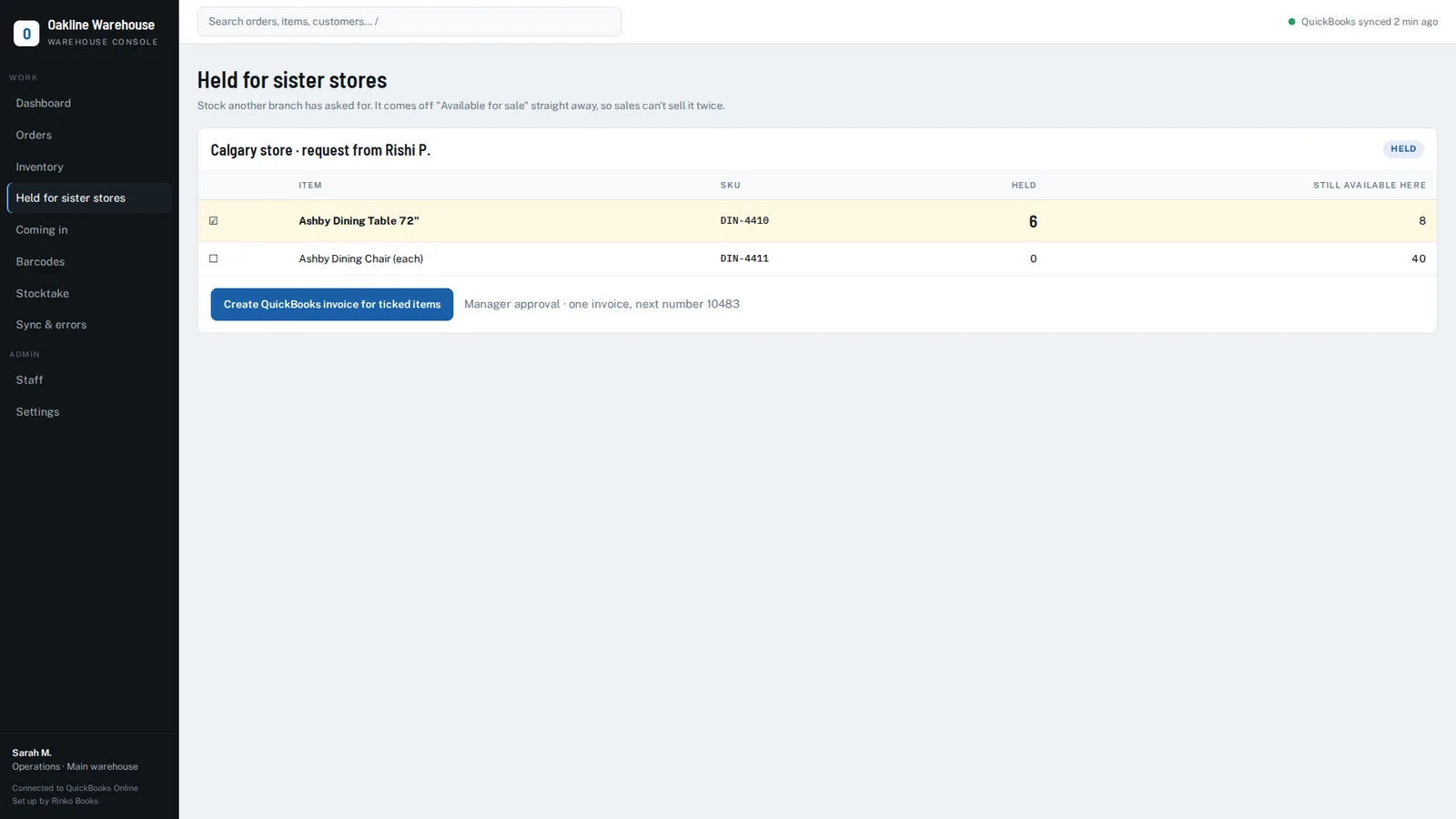
Our warehouse layer for QuickBooks Online treats stock held for a sister branch as its own state: it comes off "available for sale" the moment it's held, a manager can raise the internal invoice in one action, and warehouse assignment follows your QuickBooks location tracking (with an authorised override a sync won't undo). Transfers between two warehouses aren't built yet — they arrive when a client needs them — so if you need full inter-warehouse transfers today, we'll tell you.
A simple rule for every multi-location business
Whatever tool you use: a hold is a transaction. If stock is promised to another location, it must be recorded somewhere everyone selling can see — the moment it's promised, not when it ships.
See it on your own QuickBooks company
A 20-minute call. We'll look at how orders move through your business today and show you exactly where the gaps are.
Book a 20-minute demo →Frequently asked questions
Can QuickBooks Online track inventory by location?
QuickBooks Online can tag transactions with a location for reporting, but it doesn't keep a separate quantity on hand per building. Per-site quantities have historically required QuickBooks Desktop Enterprise with Advanced Inventory, or an add-on.
How do I stop two stores selling the same stock in QuickBooks?
Record holds for the other location immediately (for example with an internal invoice), sell from an available-for-sale figure that subtracts held stock, and record physical moves between locations.
QuickBooks and QuickBooks Online are trademarks of Intuit Inc. Rinko Books' warehouse software works with QuickBooks Online; it is an independent product and is not made, endorsed, certified or sponsored by Intuit.